
How to Build a Merge Watermelon Game in Unity
Author: Shiguang (Yixian Studio)
Reviewed by: Baiyan
A game called Merge Watermelon recently took over Qzone. Once everyone was hooked, players started jokingly calling themselves “watermelon people.” Memes, parody images, Watermelon bots, and spin-offs soon followed, including Liver-Saving Merge Watermelon, Merge Tiny Grapes, and Merge a Great Nation… Here is how to build your own version in Unity.
Step 1: Gather the assets
The image assets, or textures, determine how the fruit looks. Swap them out for something else, perhaps boobs (ahem), Polandballs, or any similar set of images, and the same game becomes a parody such as Merge a Great Nation.
To keep things simple, and definitely not because I cannot draw, I used a few colored balls for the fruit:

From left to right, they represent a grape, a little cutie, an orange, a lemon, a kiwifruit, a tomato, half a watermelon, and a whole watermelon. Two pieces of fruit at the same level merge into one at the next level. Make the whole watermelon and you win.
I left intermediate fruit such as coconuts and potatoes out of the merge chain. They all work the same way, so there was no reason to draw them~~ (Fine, I was just being lazy.~~)
Step 2: UI
I put together a simple UI:
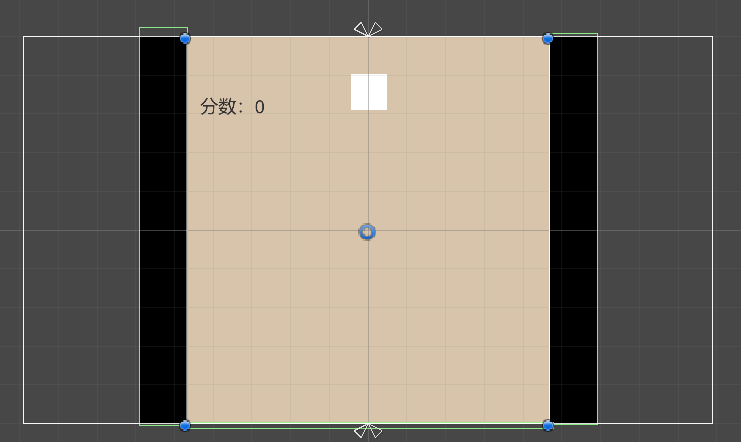
The UI has three main parts. The white image at the top shows which fruit will appear next. The score in the upper-left tracks the points earned from merges. Finally, colliders on the left, right, and bottom edges keep the fruit from falling off the screen.
With the assets and UI ready, we can plan the code.
Step 3: Write the game logic
The basic idea is straightforward. Give each fruit a 2D Rigidbody and a 2D Circle Collider, then instantiate the corresponding “next fruit” at the x-coordinate of the mouse click. When two matching pieces of fruit collide, destroy them, create the next fruit in the chain, and increase the score.
First, instantiate the next fruit at the mouse pointer’s x-coordinate. Because fruit objects are later destroyed, we cannot work directly on the source object. Once it disappeared, there would be nothing left from which to create another instance. Instead, keep the source object intact and instantiate copies that the game can safely destroy.
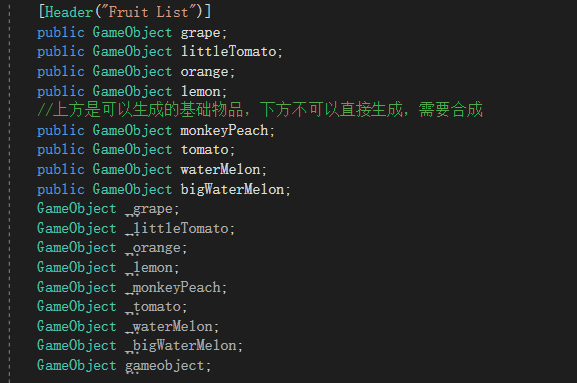
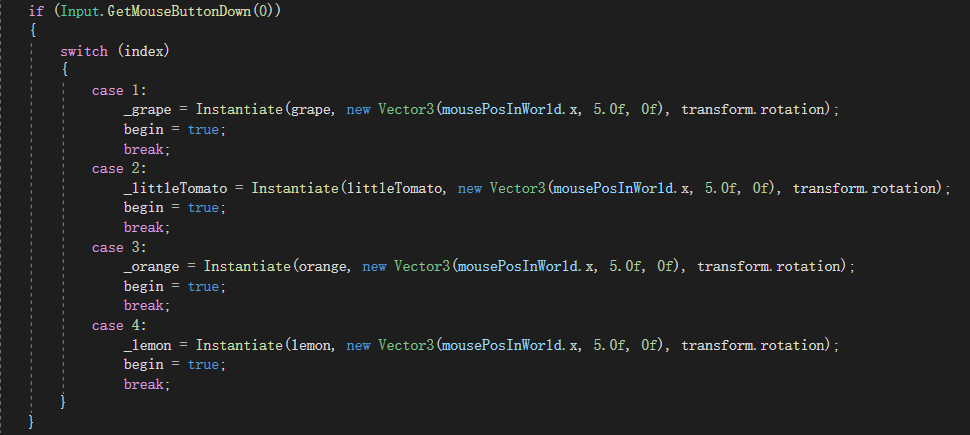
In the two images above, the objects marked with the public access modifier are the original fruit objects; the implicitly declared objects below them hold the corresponding copies. When the player clicks, the program uses a previously generated random number to choose a fruit and instantiates it at the mouse pointer’s world-space x-coordinate. The fixed y-coordinate, 5.0f, makes the fruit drop from the top of the screen.
Next, make two matching pieces of fruit disappear, “merge” them into the next fruit, and award points. The grape provides a simple example:
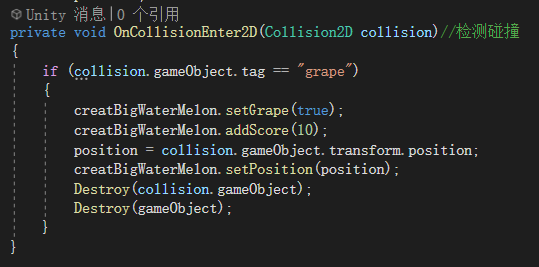
This code performs four operations: it sets the collision Boolean to true, adds 10 points to the score, records the collision position, and destroys both colliding objects.
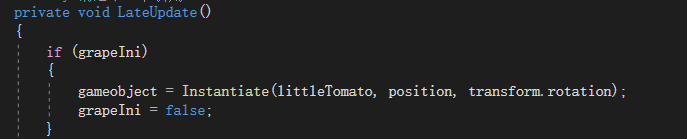
Notice that I do not create the next-level object inside the collision event. Both pieces of fruit have colliders, so each one calls this method and the code runs twice. Instantiating the next fruit here would therefore create two copies in the same place. They would immediately merge again and race straight to the end of the chain: the watermelon.
Instead, I set a Boolean flag. Another class checks that flag in LateUpdate and creates the next-level fruit there, preventing the duplicate:
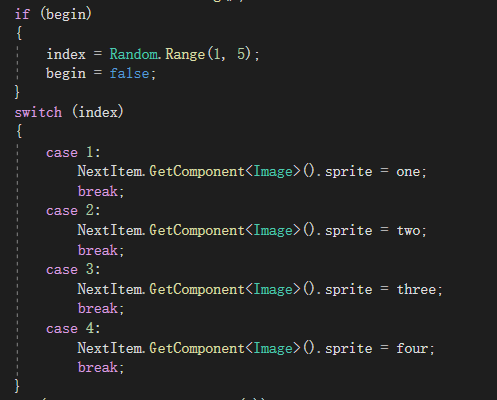
The last step is choosing the random “next fruit.” A random number does the job:
Conclusion
That is the basic approach. In roughly 200 lines, this Merge Watermelon remake already reproduces most of the original game’s features. It still needs a loss condition, which could use a trigger and a timer in FixedUpdate (I was too lazy, and besides, I never lose anyway), as well as some “exciting” sound effects (heavy sarcasm). Even then, it does not feel quite as good as the original~
 爱发电(点击图片跳转)