
Recreating Arknights in Unity
Author: Shiguang
Reviewer: Guanfu · Juntian
I. Introduction
For this studio assessment at school—yes, another assessment—we had to recreate a game. We were given three choices: Don’t Starve, Slay the Spire, or Soul Knight. I had never played any of them, so after some thought, I decided to make a rough version of Arknights instead. I had seen an expert on Bilibili build the Arknights battle interface in only 48 hours. It did not look that hard… so I gave it a try!
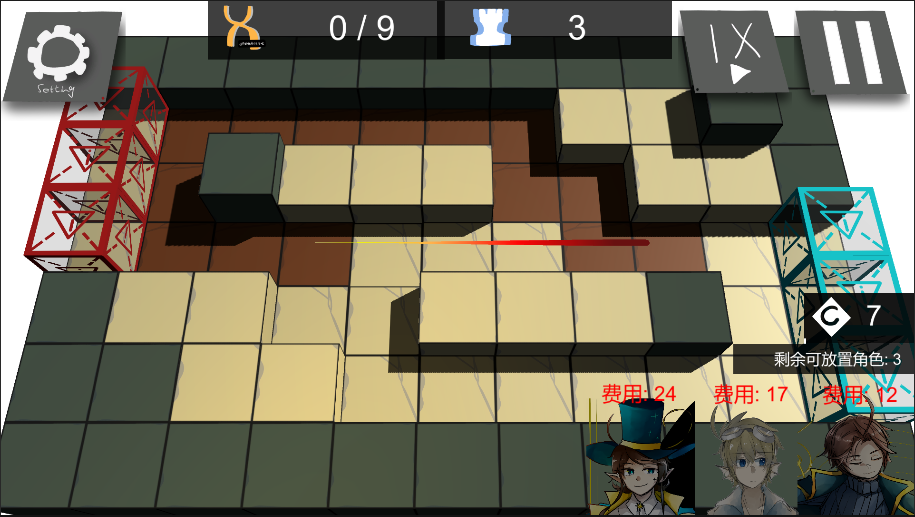
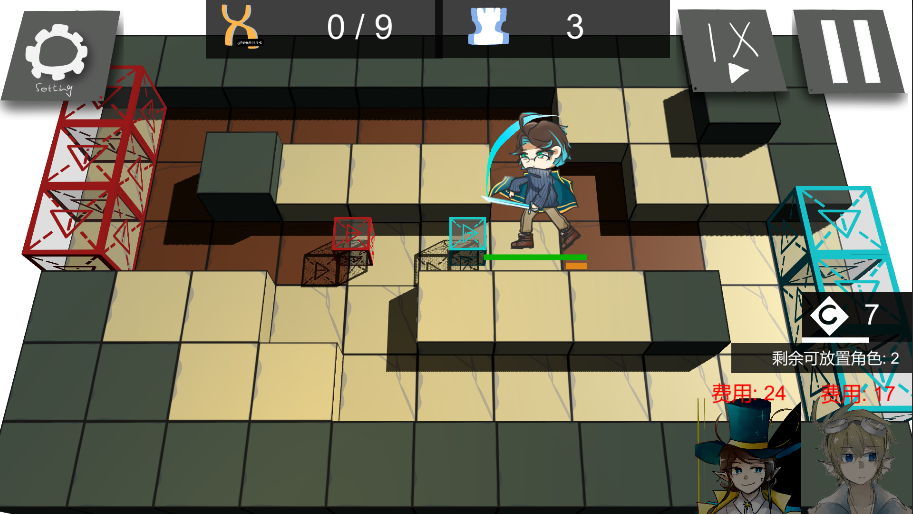
It was only after I started that I discovered how challenging the project really was. Here are two screenshots of the game interface. To see the full game in action, watch the video posted on Bilibili through the Alliance’s official account.
II. Design Approach
Scenes
My original plan called for five scenes: two stages, an operator-selection screen, a home screen, and a login/start screen, along with some localized content. That was a substantial amount of work. When time ran short, I scaled the project back to the login/start screen and a single stage.
Operators: 2D Skeletal Animation/Trail Renderer
Which operators should I use for the demonstration? Arknights has not released its operator artwork publicly, so obtaining the corresponding GIFs would be difficult. Drawing the characters myself also sounded like a lot of work.
After going back and forth for quite a while, I decided to draw three original characters and use 2D skeletal animation for their idle and combat animations. Readers interested in 2D skeletal animation can find Michael’s tutorial series on Bilibili.
During combat, you may notice some secret-sauce effects around the operators. I made them with Unity’s built-in Trail Renderer component. It is a powerful tool that can produce some very cool results with only a little code.
Stage: 2.5D/Orthographic Camera + Perspective Camera
I based the stage interface entirely on one of the stages in Arknights itself.
The maps in Arknights are 3D, while the operators are flat 2D characters. Mixing the two inevitably creates problems. After considering several approaches, I decided to build a 3D map inside a 2D scene, making it 2.5D in a sense. Unity’s default cube happens to have a length and width of 1, which lines up perfectly with the map tiles and produces the result below:
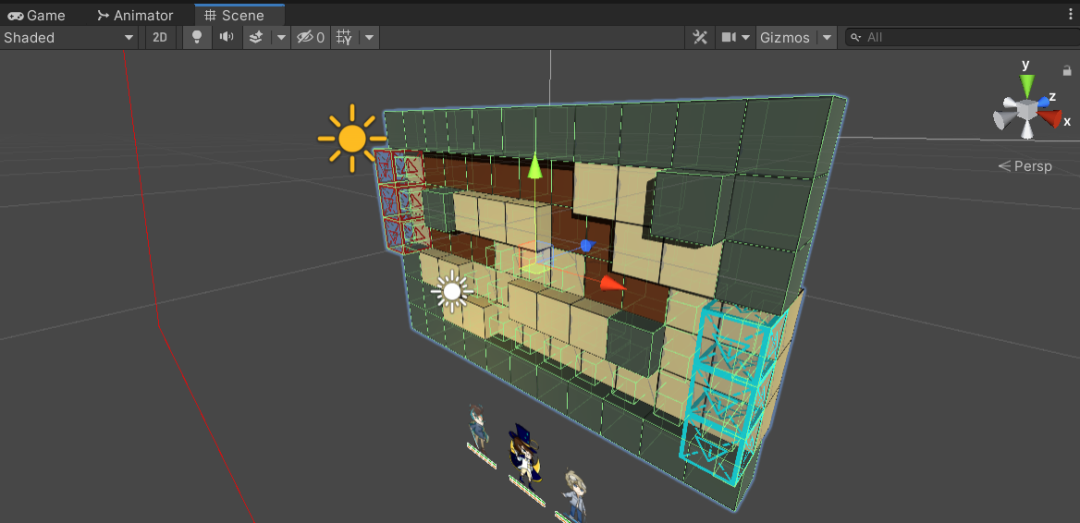
I wanted nearby objects to appear larger than distant ones, so the camera rendering the map had to use perspective projection rather than an orthographic view. This distorted the allied operator sprites whenever they moved near the edge of the map. To solve the problem, I added a second, orthographic camera dedicated to rendering the operator prefabs. Once an operator was instantiated by dragging, it appeared to stand upright on the map from every angle.
This approach creates another problem: near the edges, the operators and tiles may no longer line up properly. I think a mathematical coordinate mapping could solve it, but that would be rather complicated…
Later, while studying Baidou Qixing’s 48-hour Arknights project, I discovered that he had used only one camera. He positioned it so carefully that the effects of perspective were minimized.
III. Implementation
The title screen is fairly simple: just a few UI elements arranged into a decent layout, so I will not go into it here.

The key elements of the stage interface fall into three broad groups: allied operators, attacking enemy units, and the UI responses to changing values. I organized them roughly as follows:
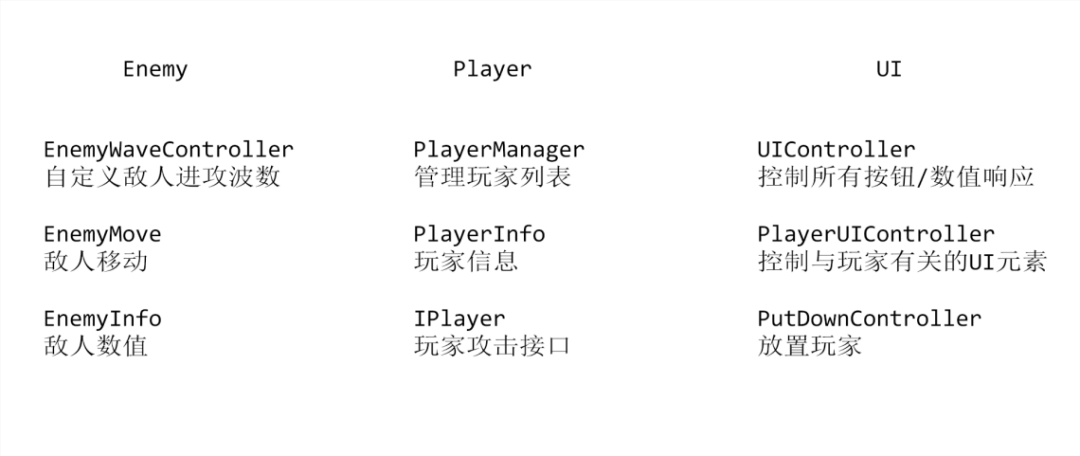
In the previous article, “Building a Merge Watermelon Game in Unity”, I made a mess of the code structure. I failed to encapsulate the parts that needed it, leaving everything exceptionally complicated and disorganized. I put a little more effort into that this time, and the structure is at least presentable now… I think. (Laughs.)
Enemy-Related Components
EnemyWaveController was “based on”—fine, copied from—a Brackeys tutorial on YouTube, while EnemyMove uses the A* algorithm. Several pathfinding algorithms besides A* can handle movement on a grid map. Interested readers can find Joe’s videos on Bilibili.
To reduce overhead, which matters when large numbers of objects are repeatedly created and destroyed, I used an object pool to spawn and despawn enemies.
Player-Related Components
The first interface I ever wrote, IPlayer, ended up handling operators’ normal and special attacks. Since every allied operator has both types of attack and a set of attributes, I created the interface for them. It proved quite convenient later on.
The player list in PlayerMgr is essential for tracking operators that have already been deployed, those still waiting to be deployed, and those within attack range. The operator buttons in the UI also depend on this list.
The player-data record stores an operator’s deployment cost, name, and other attributes.
UI-Related Components
The UI contains many button OnClick events, along with several event delegates tied to numerical values.
The most complex part is undoubtedly the drag-and-drop sequence for instantiating an operator, placing it, and setting its facing direction. My approach is roughly this:
Click an operator button in the list and use eventHandler’s drag function to instantiate the corresponding operator at the mouse pointer → while dragging the operator, turn the corresponding tile green by changing the material’s color → release the mouse; if the position is valid, snap the operator to the center of the tile → set its facing direction, which also changes its attack range → complete the placement.
The idea is simple enough, but the implementation gets a little complicated… I am sure there is a faster, cleaner approach.
IV. Review and Reflection
There is plenty of room for improvement. From a coding perspective, the code is still not concise enough, especially in the drag-and-drop placement module, and it is not sufficiently object-oriented.
From a gameplay perspective, randomly generated maps and enemies would also greatly improve both replayability and difficulty.
Finally, thank you for reading this far! If you have comments or suggestions about the project, feel free to message A-Jun privately to discuss them.
The source code has been uploaded to GitHub: https://github.com/Guiny-Time/Arknights
 爱发电(点击图片跳转)